 AI Game Mods
The field guide / Universal Modder
Universal Modder errors and troubleshooting
Last updated: · By Jin Song
Start with the exact message and the setup that produced it. Issue-based guidance and the cloud test’s reproduced results are identified separately. Use a backed-up, single-player setup. For prerequisites, see how to install Universal Modder and the Windows / WSL checklist.
spawn git ENOENT
Meaning: Gemini CLI could not locate Git while cloning the repository. In the Windows 10 report, the maintainer identifies a missing Git installation or a missing PATH entry.
Maintainer fix: install Git for Windows, close and reopen the terminal so it reads the updated PATH, confirm Git can print its version, then retry installation. The reply also explains that the Windows command launcher avoids the PowerShell script launcher when script execution is disabled; Command Prompt is another option. The linked reply includes the Windows launcher details.
Issue #109 and maintainer reply.
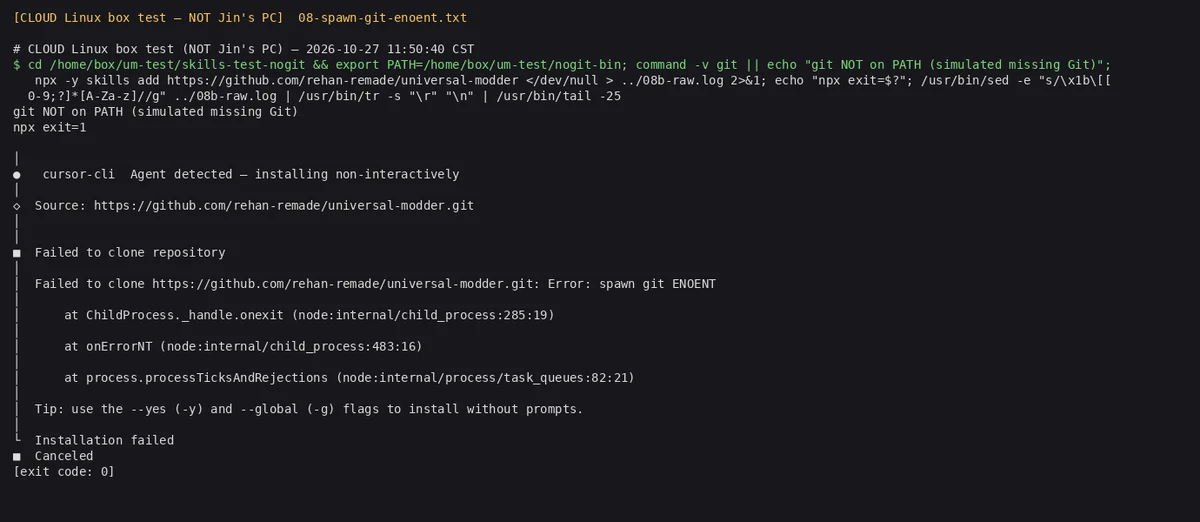
We reproduced this on 2026-10-27 during the cloud Linux run performed by an AI agent on Jin Song’s behalf. With Git removed from PATH, the npx skills installer failed to clone; restoring Git availability corresponds to the successful clean skills run. This was a Linux skills-installer reproduction, not a test of Gemini CLI on Windows. Failure transcript · successful skills install.
git NOT on PATH (simulated missing Git)
npx exit=1
…
│  Failed to clone https://github.com/rehan-remade/universal-modder.git: Error: spawn git ENOENT
Recorded output: 08-spawn-git-enoent.txt
The valid isolated-environment check in the same run showed um kb search working without Git on PATH. The installer’s dependency on Git should not be confused with the knowledge-base search cache. The earlier check in that transcript inspected Git from the outer shell; the later isolated run is the relevant evidence. Search-without-Git transcript.
UnicodeEncodeError: 'charmap' codec can't encode character
Meaning: the knowledge-base search tried to print a character the Windows cp1252 console encoding cannot represent. The report used Windows 11, Python 3.11 and um 0.2.0.
No official fix yet in the supplied thread: it has no maintainer reply. The reporter says enabling Python UTF-8 mode by setting the environment variable PYTHONUTF8 to 1 before the knowledge-base command worked. That is a reported workaround, not a merged fix. The startup stdout change suggested in the issue is a proposal only.
The cloud Linux test could not reproduce the Windows console condition: forced cp1252/ascii output completed without an exception, which does not establish a Windows fix. Linux proxy test.
Issue #152: Unicode search crash.
' "" ' is not recognized as an internal or external command, operable program or batch file.
Meaning: while running the GTA example’s build script, Visual Studio discovery did not find the C++ x64 tools. The maintainer says the compiler setup variable was empty, producing the blank command in this message. This heading preserves the unusual quoting in the issue body.
Maintainer fix: install Visual Studio 2022 or its Build Tools with the Desktop development with C++ workload. Alternatively, point VCVARS at your existing vcvars64.bat. The reply says #90 adds a clearer message; it does not say that installing Universal Modder alone supplies the compiler.
Issue #88 and maintainer reply. See the Minecraft in GTA V guide for that example’s requirements.
First um kb search seems to hang
Symptom → cause → what to expect: the first search outside a clone waited about 45 seconds without progress output while mirroring the knowledge base into ~/.universal-modder/kb/. Later searches in the run completed in less than a second, and the clone used its local knowledge directory. These are recorded timings on this VM, not a timeout guarantee for other connections. Search transcript · timing report.
A natural-language question belongs in the AI agent, not an invented ask subcommand. The tested um CLI commands show the actual scan and search calls and the recorded invalid-command result.
Gotchas from field notes
These are contributor observations for the named setups, separate from official issue fixes.
- Game says it is already running after a crash → lingering crash reporter → inspect the running processes and clean up the exact reporter PID. Never use a process-name pattern. Driving real games safely.
- Clicks consistently miss their screenshot target → logical click coordinates versus physical screenshot pixels → measure the display scaling and convert the coordinates. The note observed this on Windows 11 at 150% scaling. Driving real games safely.
- A 64-bit xEdit tool faults in a WoW64 prefix → wrong prefix architecture → recreate a 64-bit Wine prefix. Other crashes in the same note required local Wine patches; this is not a promise that every Windows tool runs on Linux. Linux modding tools note.
- Screenshots keep showing the same animated-game frame → stale capture after ReShade processing → compare successive capture hashes while checking the game is actually active, then use a capture from inside the measured renderer. Verification oracles note.
Version pinning report
Issue #162 is titled “Universal Moddder Pinned to 0.2.0”. Its body contains an image only, and the supplied comments are empty. There is no official fix yet in this snapshot, and insufficient text to diagnose a cause or recommend an upgrade command.
Game-specific errors
For build-specific native crashes and hangs, see the Bannerlord symptom catalogue; some documented guards were compiled but not run in-game. Source: native crashes note.
For the separate SkyCraft project, see SkyCraft reported problems, with user-attributed suggestions and no maintainer replies in the supplied snapshot.
These are contributor observations for particular game versions, rather than official Universal Modder fixes. Read the linked game guide and source note before applying a change. Keep backups and use a single-player test save; Project Zomboid server context is limited to administration of your own modpack.
Act 2 never loads (hang at 50% or crash)
Symptom → cause → reported fix: a frozen load bar or crash shared the same fault; one NPC in Many More Monsters had an unresolved level layer. Bisecting repacked copies isolated it, and a local copy without that entity loaded. Clean static scans did not establish that runtime loading was safe. Keep a pristine pak and use throwaway characters for removal tests; an existing save may require its recorded modules. Game guide; source note.
Scrolls became equippable and unusable.
Symptom → cause → reported fix: the generator made stubs for its own scrolls and gave them an armour type, shadowing the real definitions. Exclude local definitions from foreign-item stubs and reject duplicate entry names. Truncated names also collided; deterministic hash suffixes and uniqueness checks resolved those collisions. Keep generated UUIDs stable because saves reference them. Game guide; source note.
Missing MetaData
Symptom → cause → reported fix: the startup popup appeared when the icon registry was absent. Supply the registry entries corresponding to the icon files. Separately, copying another mod’s compiled shaders crashed startup; referencing the source material as a soft dependency fixed that case. Game guide; source note.
Device or resource busy
Symptom → cause → reported fix: deployment could not replace a loaded pak because the running game held it open. Check that the game has closed before replacing it. For garments disappearing at distance, the note instead corrected mismatched LOD distances and declared tiers; these are different symptoms. Game guide; source note.
Whole load order reset to one entry on launch, every time.
Symptom → cause → reported fix: malformed metadata in a self-made pak caused repeatable resets. Copy a working metadata structure and leave its dependency node empty rather than guessing values. This does not diagnose intermittent resets. Entries outside the correct Mods node were ignored, and renamed module folders required updating the Folder field as well as identity/version fields. Game guide; source note.
Choices Pending
Symptom → cause → reported fix: a modded class inherited an equipment selector without the Null or Default options expected by Starting Equipment Selection. Replacing the affected progression rows under their original UUIDs with the compatible selector and default allowed class creation. For non-stacking damage reduction, the separate fix was bare reduction on separate armour-tier items rather than a condition-wrapped reduction. Game guide; source note.
STATUS_DLL_NOT_FOUND
Symptom → cause → reported fix: the portable Blender build used for NIF import lacked the VC++ runtime; the MSI installation worked. The report used the older Blender branch for that addon and a separate Blender setup for BG3 export. Game guide; source note.
Scabbard and sheathed blade drift apart when walking.
Symptom → cause → reported fix: the scabbard followed the thigh while the sheathed blade followed the root. Weighting the scabbard to Root_M kept them aligned. The sword’s stowed position was corrected with a Dummy_Sheath bone rather than a change that moved its hand grip. Game guide; source note.
tModLoader refuses to start.
Symptom → cause → reported fix: the tModLoader app was not in the Steam library. Adding the app resolved the ownership check; this guide offers no substitute for that requirement. Game guide; source note.
Recording from inside the game leaked 17 GB of memory in one take.
Symptom → cause → reported fix: repeated D3D11 backbuffer reads allocated staging textures. Capture the game window externally instead. Missing recording audio had a separate cause: Windows FAudio used WASAPI directly, so the note used process-loopback capture. Game guide; source note.
Trace replay disagreed on every dash.
Symptom → cause → reported fix: the simulator applied each recorded action a frame early. Align actions with the following frame. Separate drift between simulators needed float32 literals; faster movement in the game came from a sunflower buff and was resolved by blocking that buff in the arena. Game guide; source note.
Serverless training failed to start.
Symptom → cause → reported fix: the model-API key lacked serverless permissions. The contributor used the approved device-flow login. This is not the same as setting FAL_KEY for model calls; the note supplies the training-specific context. Game guide; source note.
Animations explode or sink by about 1 m.
Symptom → cause → reported fix: imported rig object scale and animation translation scale disagreed. Match the translation scale to whether the rig’s object scale has been applied; do not treat one scale factor as universal. Game guide; source note.
Mod sounds are silent.
Symptom → cause → reported fix: Unity audio was disabled in the player. The project used vanilla Wwise events; the note also names compatible Wwise banks as an alternative. A normal Unity AudioSource did not solve this. Game guide; source note.
NullReferenceException in vanilla on-hit code from your attack.
Symptom → cause → reported fix: a hand-built damage record lacked the hurtbox reference expected by vanilla readers. Populate the hit hurtbox and apply its damage modifier, following the existing attack implementations. Compilation alone did not check installed-game API compatibility; the note added a reflection check. Game guide; source note.
Commando flashes for one frame on the character select.
Symptom → cause → reported fix: the skin system reapplied Commando’s model on loadout changes. Check and reapply the custom mesh/material each LateUpdate. The cape’s separate frame lag required running its bone reads after ModelLocator moved the model; extra renderers also had to be added back after each skin application. Game guide; source note.
World loading could not proceed
Symptom → cause → reported fix: unresolved vehicle templates/parts or a recipe referencing a missing fluid stopped world creation. The final exception summarizes failure; look earlier in console.txt for the source. In the reported setup, disabling the broken vehicle modules and replacing the original Common Sense upload with its matching fork let the world load. This is version-specific evidence, not a current mod blacklist. Game guide; source note.
ERROR: part "BR89SpareTiresPD" not found
Symptom → cause → reported fix: a vehicle mod referenced a part not defined in the inspected mod/library folders. Disabling the referencing mod removed that failure. A large subscriber count was not evidence that the installed build was compatible. Game guide; source note.
Fluid not found: Alcohol
Symptom → cause → reported fix: the original Common Sense upload had a recipe referencing a fluid absent from this build. The contributor replaced it with Common Sense [B42.20+]. Do not assume that historical upload diagnosis still applies to a newer build. Game guide; source note.
MISSING MODS
Symptom → cause → reported fix: copied preset ids carried leading backslashes and failed exact matching. Write bare ids, read dependency metadata from the selected version folder, and edit the preset only with the game closed so its in-memory copy cannot overwrite changes. Duplicate ids remained ambiguous in this report. Game guide; source note.
Required mod not found
Symptom → cause → reported fix: the older metadata parser interpreted a URL containing an id query as the mod id. Removing that URL line or the query fixed recognition. This was not proof that the mod was absent from disk. Game guide; source note.
Object tried to call nil in mapLoadingRadios
Symptom → cause → reported finding: decorative map radio sprites were not radio objects, but the callback ran for them. The note identifies old recurring log noise, not the cause of silent radios, and supplies no isolated fix for this message. Game guide; source note.
Incorrect argument
Symptom → cause → reported finding or fix: Renamed Minecraft game rules caused this log message. The note corrects the rule names for the recorded Minecraft build; confirm those names against your actual version. Source note; how to merge two games with AI.
moved wrongly
Symptom → cause → reported finding or fix: The stand-in player collided with barrier walls the Portal 2 player could cross. The reported fix disables its physics only while the server handles movement packets, rather than treating the error as camera drift. Source note; how to merge two games with AI.
Could not find or load main class net.fabricmc.loader.impl.launch.knot.KnotClient
Symptom → cause → reported finding or fix: A home-made launcher skipped Fabric Loader because its profile lacked a checksum for that library. The reported packaging fix supplies the loader checksum and size, and tests an installed copy through the player’s official launcher. Source note; how to merge two games with AI.
System.Drawing.Common ... manifest definition does not match
Symptom → cause → reported finding or fix: Reclaimer and the WindowsDesktop framework supplied different System.Drawing.Common versions. The contributor used a coreclr runtime configuration naming only Microsoft.NETCore.App and added the Reclaimer library folders to the Python search path. Source note; how to merge two games with AI.
Failed to create Python type for Reclaimer.Drawing.DdsImage
Symptom → cause → reported finding or fix: Python reflection reached WPF-typed members without PresentationCore. The reported fix keeps DdsImage inside .NET and performs the conversion there through a compiled delegate instead of returning it to Python. Source note; how to merge two games with AI.
'ICacheFile' object has no attribute 'CreateReader'
Symptom → cause → reported finding or fix: pythonnet returned the interface rather than the concrete implementation. The note resolves the implementation object before using its reader. Source note; how to merge two games with AI.
Incomplete (expected 3 coordinates)
Symptom → cause → reported finding or fix: A Polish locale formatted a decimal with a comma, breaking machine-read coordinates. The note formats machine-read text with the root locale so the parser gets a decimal point. Source note; how to merge two games with AI.
Requested function "..." cannot be executed now
Symptom → cause → reported finding or fix: Halo answered an unregistered Chimera reload command with this message. The note identifies the actual reload command but had not re-tested it on this setup; restarting Halo also worked. Consult the source for the exact game-specific command. Source note; how to merge two games with AI.
UnicodeDecodeError: 'gbk' codec can't decode byte 0xa3
Symptom → cause → reported finding or fix: Window-title bytes failed under the locale-based subprocess decoder. The contributor set PYTHONUTF8 to 1 and PYTHONIOENCODING to utf-8 before using the affected Windows tools. Source note; how to merge two games with AI.
FileNotFoundError: <repo>\TEMPLATE.md
Symptom → cause → reported finding or fix: The knowledge-note root was set to the repository instead of its knowledge directory. The reported fix selects the knowledge directory as the root; the source records the tool-specific syntax. Source note; how to merge two games with AI.
Failed to find global tag 'kBufferTypeDepth'
Symptom → cause → reported finding or fix: The Wukong log repeatedly reported a missing Streamline depth tag. The source does not give a confirmed fix for this log message; its separate ReShade screenshot test found flat depth at the main menu, with gameplay depth still untested. Source note; how to merge two games with AI.
Event loop start
Symptom → cause → reported finding or fix: The note mentions this crash as the reason for game-specific community UE4SS builds. It does not report testing that fix on this setup; use the named note for context rather than treating those builds as a verified solution. Source note; how to merge two games with AI.
Gradle fails resolving Loom 1.18.
Symptom → cause → reported finding or fix: The recorded Loom build required a Java 25 JVM. The contributor pointed Gradle at that JDK while retaining the mod’s Java 21 target; those are distinct requirements for the reported setup. Source note; how to merge two games with AI.
Unknown native engine
Symptom → cause → reported finding or fix: The scanner did not recognise UE3 in this Borderlands 2 setup. The contributor identified it from the game’s cooked package layout and UE3 package tag; an unknown scan result did not establish that the game could not be modded. Source note; how to merge two games with AI.
std::min errors inside gothic-api TUs.
Symptom → cause → reported finding or fix: Windows headers introduced min/max macros that conflicted with the code. The reported compile fix undefines those macros after the includes; this does not establish that the unfinished plugin works in-game. Source note; how to merge two games with AI.
If it still fails
Keep the exact error, game and agent versions, operating environment, and the last step that worked. Compare those with the linked report before applying a workaround. Reduce the mod to one small test and record what remains unverified. Use the prompt library to define that small slice.